

How can we help?
Enter whatever you're curious about and we'll give you a smart summary of the best answers as well as relevant articles.

Enter whatever you're curious about and we'll give you a smart summary of the best answers as well as relevant articles.

Lorem ipsum dolor sit amet, consectetur adipiscing elit. Ut et massa mi.

Lorem ipsum dolor sit amet, consectetur adipiscing elit. Ut et massa mi.

Lorem ipsum dolor sit amet, consectetur adipiscing elit. Ut et massa mi.


If you are a member of Fabshop, you should be listing your products in their network! The Like Sew system allows you to do this in the Inventory area. Here is what you need to do:
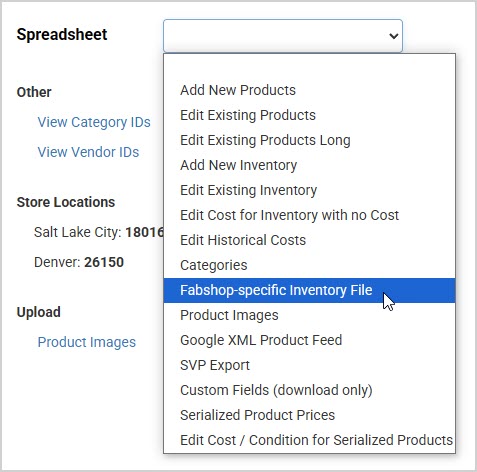
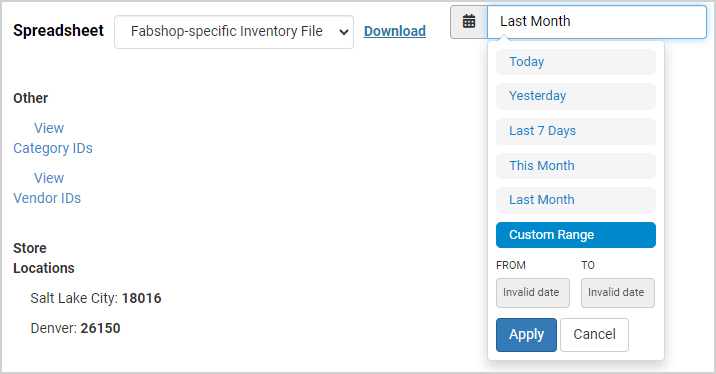
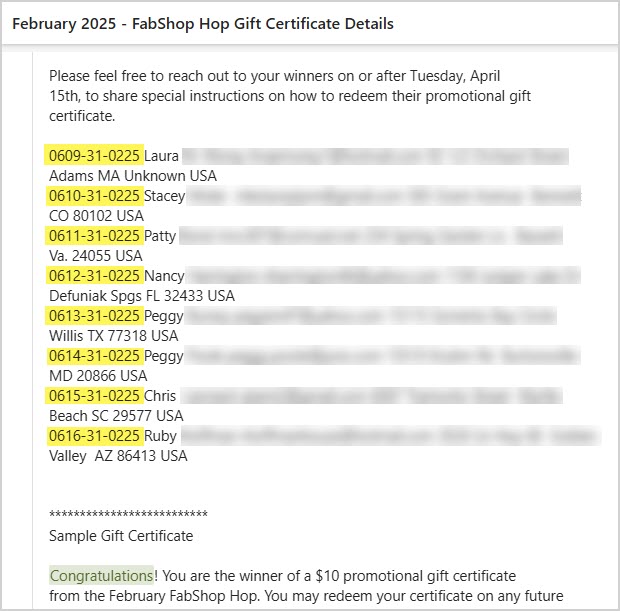
Every month, you'll receive an email from FabShop with the winners for whom you need to create Gift Certificates in the system. This email includes the codes to use for each one, as pictured here:
In the Like Sew system, first you'll need to go to Inventory > Gift Cards and follow these steps to enter the Gift Cards into the system so your winners can use them:
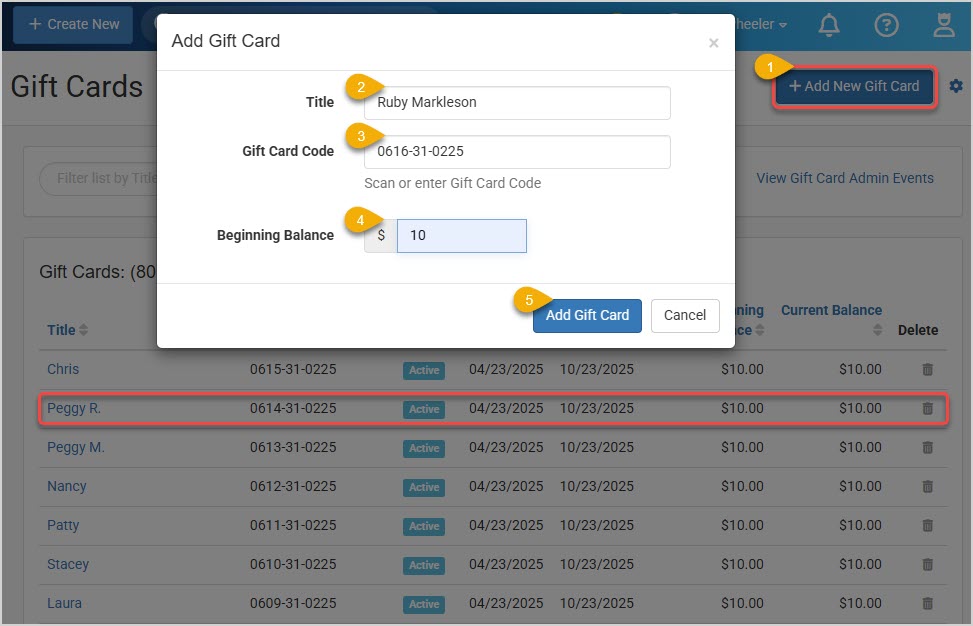
Please Note: These steps will need to be done by someone with permission to create Gift Cards in the system.
You'll see a new line item at the top of the list for the new Gift Card. Now when you send that winner their congratulations email, they will be able to use the code on your website at checkout or they can give the code to your cashier for in-store purchases.
Repeat the steps above for each winner, then you can send out the Congratulations emails and their Gift Cards will be active for them to use.
Please Note: If they have unsubscribed from any of your automated Marketing emails, you can re-subscribe them from here, if that is what the customer wants. Please do not re-add a customer to an automated email unless you are sure they are wanting to receive it.
Please Note: If they have unsubscribed from any of your automated Marketing emails, you can re-subscribe them from here, if that is what the customer wants. Please do not re-add a customer to an automated email unless you are sure they are wanting to receive it.
Please Note: If they have unsubscribed from any of your automated Marketing emails, you can re-subscribe them from here, if that is what the customer wants. Please do not re-add a customer to an automated email unless you are sure they are wanting to receive it.
Please Note: If they have unsubscribed from any of your automated Marketing emails, you can re-subscribe them from here, if that is what the customer wants. Please do not re-add a customer to an automated email unless you are sure they are wanting to receive it.
Offer your customers the best possible savings with the Coupon & Discount Stacking feature while you maintain control over the way your discounts work! This feature lets you manage how multiple coupons and discounts can be applied when selling face to face in the Register and when selling through your website. Take a look!
To begin configuring how you want your coupons and discounts to work in the Register, click the Admin Button in the upper right that has your username and go to Settings > POS Settings. The General tab will open for you and you can find the Coupons & Discounts section near the bottom.
You have a several options for how multiple discounts and/or coupons can be applied in the Register.
You can turn off the Line Item Discounts if you don't want to allow specific discounts on individual line items. By default this is on.
For the Discount Override for Non-Discountable Items setting, it applies to line-items in the Register. If you check the box for this setting, it will not allow items to be discounted if they are set to not allow discounts in the Product, Service, or Class, or at the Department level. Normally in the Register users can override such settings if needed. If the above setting for Line Item Discounts is disabled, this option is grayed out.
If you sell services through your Register, you can choose to Apply Transaction Discounts to Services if you wish for those to be discountable. This applies only to line-item services added manually to the Register.
You can Apply Transaction Discounts to Purchased Gift Cards if you wish. Be aware, discounting the original card purchase might be 'double-dipping' by also allowing items purchased with the Gift Card to be discounted as well. Most stores leave this setting off.
The Disable Coupons & Discounts for Sale Price Items is a setting for which many of our clients have asked. If you check the box for this setting, items with an active Sale Price will not be discounted, even if they would normally be eligible.
When working with discounts and coupons in the Register, you can see a breakdown of all that have been applied or you can manually adjust discounts by clicking on the Discount link in the register sidebar, as pictured here:
For your website, your customers can get discounts via coupons you offer, and there is a settings area that allows you to configure how that works. Click on the Admin Button with your username in the upper left of the system and go to Settings > Website Settings > Shopping Cart. Scroll down the page until you see the section for Coupons like the one pictured below.
You have a couple of options for how multiple coupons can be applied in the website for your customers:
Offer your customers the best possible savings with the Coupon & Discount Stacking feature while you maintain control over the way your discounts work! This feature lets you manage how multiple coupons and discounts can be applied when selling face to face in the Register and when selling through your website. Take a look!
To begin configuring how you want your coupons and discounts to work in the Register, click the Admin Button in the upper right that has your username and go to Settings > POS Settings. The General tab will open for you and you can find the Coupons & Discounts section near the bottom.
You have a several options for how multiple discounts and/or coupons can be applied in the Register.
You can turn off the Line Item Discounts if you don't want to allow specific discounts on individual line items. By default this is on.
For the Discount Override for Non-Discountable Items setting, it applies to line-items in the Register. If you check the box for this setting, it will not allow items to be discounted if they are set to not allow discounts in the Product, Service, or Class, or at the Department level. Normally in the Register users can override such settings if needed. If the above setting for Line Item Discounts is disabled, this option is grayed out.
If you sell services through your Register, you can choose to Apply Transaction Discounts to Services if you wish for those to be discountable. This applies only to line-item services added manually to the Register.
You can Apply Transaction Discounts to Purchased Gift Cards if you wish. Be aware, discounting the original card purchase might be 'double-dipping' by also allowing items purchased with the Gift Card to be discounted as well. Most stores leave this setting off.
The Disable Coupons & Discounts for Sale Price Items is a setting for which many of our clients have asked. If you check the box for this setting, items with an active Sale Price will not be discounted, even if they would normally be eligible.
When working with discounts and coupons in the Register, you can see a breakdown of all that have been applied or you can manually adjust discounts by clicking on the Discount link in the register sidebar, as pictured here:
For your website, your customers can get discounts via coupons you offer, and there is a settings area that allows you to configure how that works. Click on the Admin Button with your username in the upper left of the system and go to Settings > Website Settings > Shopping Cart. Scroll down the page until you see the section for Coupons like the one pictured below.
You have a couple of options for how multiple coupons can be applied in the website for your customers:
Offer your customers the best possible savings with the Coupon & Discount Stacking feature while you maintain control over the way your discounts work! This feature lets you manage how multiple coupons and discounts can be applied when selling face to face in the Register and when selling through your website. Take a look!
To begin configuring how you want your coupons and discounts to work in the Register, click the Admin Button in the upper right that has your username and go to Settings > POS Settings. The General tab will open for you and you can find the Coupons & Discounts section near the bottom.
You have a several options for how multiple discounts and/or coupons can be applied in the Register.
You can turn off the Line Item Discounts if you don't want to allow specific discounts on individual line items. By default this is on.
For the Discount Override for Non-Discountable Items setting, it applies to line-items in the Register. If you check the box for this setting, it will not allow items to be discounted if they are set to not allow discounts in the Product, Service, or Class, or at the Department level. Normally in the Register users can override such settings if needed. If the above setting for Line Item Discounts is disabled, this option is grayed out.
If you sell services through your Register, you can choose to Apply Transaction Discounts to Services if you wish for those to be discountable. This applies only to line-item services added manually to the Register.
You can Apply Transaction Discounts to Purchased Gift Cards if you wish. Be aware, discounting the original card purchase might be 'double-dipping' by also allowing items purchased with the Gift Card to be discounted as well. Most stores leave this setting off.
The Disable Coupons & Discounts for Sale Price Items is a setting for which many of our clients have asked. If you check the box for this setting, items with an active Sale Price will not be discounted, even if they would normally be eligible.
When working with discounts and coupons in the Register, you can see a breakdown of all that have been applied or you can manually adjust discounts by clicking on the Discount link in the register sidebar, as pictured here:
For your website, your customers can get discounts via coupons you offer, and there is a settings area that allows you to configure how that works. Click on the Admin Button with your username in the upper left of the system and go to Settings > Website Settings > Shopping Cart. Scroll down the page until you see the section for Coupons like the one pictured below.
You have a couple of options for how multiple coupons can be applied in the website for your customers:
Offer your customers the best possible savings with the Coupon & Discount Stacking feature while you maintain control over the way your discounts work! This feature lets you manage how multiple coupons and discounts can be applied when selling face to face in the Register and when selling through your website. Take a look!
To begin configuring how you want your coupons and discounts to work in the Register, click the Admin Button in the upper right that has your username and go to Settings > POS Settings. The General tab will open for you and you can find the Coupons & Discounts section near the bottom.
You have a several options for how multiple discounts and/or coupons can be applied in the Register.
You can turn off the Line Item Discounts if you don't want to allow specific discounts on individual line items. By default this is on.
For the Discount Override for Non-Discountable Items setting, it applies to line-items in the Register. If you check the box for this setting, it will not allow items to be discounted if they are set to not allow discounts in the Product, Service, or Class, or at the Department level. Normally in the Register users can override such settings if needed. If the above setting for Line Item Discounts is disabled, this option is grayed out.
If you sell services through your Register, you can choose to Apply Transaction Discounts to Services if you wish for those to be discountable. This applies only to line-item services added manually to the Register.
You can Apply Transaction Discounts to Purchased Gift Cards if you wish. Be aware, discounting the original card purchase might be 'double-dipping' by also allowing items purchased with the Gift Card to be discounted as well. Most stores leave this setting off.
The Disable Coupons & Discounts for Sale Price Items is a setting for which many of our clients have asked. If you check the box for this setting, items with an active Sale Price will not be discounted, even if they would normally be eligible.
When working with discounts and coupons in the Register, you can see a breakdown of all that have been applied or you can manually adjust discounts by clicking on the Discount link in the register sidebar, as pictured here:
For your website, your customers can get discounts via coupons you offer, and there is a settings area that allows you to configure how that works. Click on the Admin Button with your username in the upper left of the system and go to Settings > Website Settings > Shopping Cart. Scroll down the page until you see the section for Coupons like the one pictured below.
You have a couple of options for how multiple coupons can be applied in the website for your customers:
Go to Marketing > Coupons and click the +New Coupon button to begin creating your coupon. When creating your coupon, select the Free Shipping option on the far right of the Coupon Type area, as pictured below.
You can also set a Minimum Purchase amount to justify the free shipping, and you can set a cap on the Maximum Discount you will allow with the coupon, so that larger item sales do not cost you too much.
Go to Marketing > Coupons and click the +New Coupon button to begin creating your coupon. When creating your coupon, select the Free Shipping option on the far right of the Coupon Type area, as pictured below.
You can also set a Minimum Purchase amount to justify the free shipping, and you can set a cap on the Maximum Discount you will allow with the coupon, so that larger item sales do not cost you too much.
Go to Marketing > Coupons and click the +New Coupon button to begin creating your coupon. When creating your coupon, select the Free Shipping option on the far right of the Coupon Type area, as pictured below.
You can also set a Minimum Purchase amount to justify the free shipping, and you can set a cap on the Maximum Discount you will allow with the coupon, so that larger item sales do not cost you too much.
Go to Marketing > Coupons and click the +New Coupon button to begin creating your coupon. When creating your coupon, select the Free Shipping option on the far right of the Coupon Type area, as pictured below.
You can also set a Minimum Purchase amount to justify the free shipping, and you can set a cap on the Maximum Discount you will allow with the coupon, so that larger item sales do not cost you too much.
After logging into the system, in the upper right click on the Admin Button with your username and go to Settings > Website Settings > Website Settings > Email, and you will see a field to enter your From Email Address. Please note the warning on the page about not using an email address provided by one of the big free email providers, such as AOL, Hotmail, Gmail, Yahoo, etc. The reason such email addresses will not work for this system is because that spammers use email addresses like that to send bulk emails out at little risk to themselves. So bulk email provider services have trouble sending messages with From email addresses like that, so in the system, we do not allow them.
After logging into the system, in the upper right click on the Admin Button with your username and go to Settings > Website Settings > Website Settings > Email, and you will see a field to enter your From Email Address. Please note the warning on the page about not using an email address provided by one of the big free email providers, such as AOL, Hotmail, Gmail, Yahoo, etc. The reason such email addresses will not work for this system is because that spammers use email addresses like that to send bulk emails out at little risk to themselves. So bulk email provider services have trouble sending messages with From email addresses like that, so in the system, we do not allow them.
After logging into the system, in the upper right click on the Admin Button with your username and go to Settings > Website Settings > Website Settings > Email, and you will see a field to enter your From Email Address. Please note the warning on the page about not using an email address provided by one of the big free email providers, such as AOL, Hotmail, Gmail, Yahoo, etc. The reason such email addresses will not work for this system is because that spammers use email addresses like that to send bulk emails out at little risk to themselves. So bulk email provider services have trouble sending messages with From email addresses like that, so in the system, we do not allow them.
After logging into the system, in the upper right click on the Admin Button with your username and go to Settings > Website Settings > Website Settings > Email, and you will see a field to enter your From Email Address. Please note the warning on the page about not using an email address provided by one of the big free email providers, such as AOL, Hotmail, Gmail, Yahoo, etc. The reason such email addresses will not work for this system is because that spammers use email addresses like that to send bulk emails out at little risk to themselves. So bulk email provider services have trouble sending messages with From email addresses like that, so in the system, we do not allow them.
Pinterest is doing wonderful things for businesses! It is clear they want to leave behind their image as a repository and index for photos and move into the role of an irreplaceable marketing tool for companies. They have also taken great pains to make sure their services are easy for you to utilize. Pinterest will put images of your products and/or services in front of people who are interested, and will drive traffic to you that is more likely to click on your Add to Cart buttons.
While Pinterest is a great tool to have in your online tool belt, its effectiveness largely depends on the nature of your business and target audience. Here are 8 important items of which to be aware about Pinterest:
Visual Content: Pinterest is, after all, a smorgasbord of pictures so businesses with strong visual content (e.g., fashion, food, travel, and DIY projects) tend to perform well. From recipes, to inspiration on what you should wear for the holidays, Pinterest is the tool to use if your business has visual media. This page on the Pinterest business site states that 85% of weekly users in the US made a purchase based on Pins from brands, so it’s definitely worth looking into.
Demographics: Pinterest demographics tend to skew towards women, according to this page on Pinterest, their audience is 70% women and 30% men. So if women are your targeted audience, or if you want to grow that demographic, consider using Pinterest as a marketing tool.
Traffic and Conversion: Pinterest can drive significant traffic to your website so it’s important to optimize your website for conversions. Pinterest is essentially a visual search engine, so focusing on creating quality, eye-catching Pins should be top priority.
Organic Reach: Compared to some other social platforms, Pinterest can still offer decent organic reach, especially if you use the right keywords and tags. Their native targeting tools will allow you to target your audience (and maybe find some new audience groups!), have full control over your budget, and view all of the analytics for your traffic.
Advertising Options: Pinterest offers advertising options to boost visibility; these can be effective but require budgeting and strategy. If you have a budget for advertising and Pinterest is a tool your business could benefit from, consider using the Performance+ tool on Pinterest. It will automatically optimize your budget to meet the goals you set for your ad campaigns, as well as to streamline the advertising process so you can focus more on other facets of your business.
Trends and Updates: Stay updated on Pinterest trends and algorithm changes, as they can impact how your content is seen by users. According to this article, Pinterest’s trend predictions have an 80% success rate. You can utilize the Pinterest Trends tool, a multi-faceted resource that enables you to not only see which trends are rising, but to also know what keywords are trending.
Pin Longevity: Pins have a longer lifespan compared to posts on many other social media platforms. A well-designed Pin can generate traffic over a long period. What exactly is the average longevity of a well-executed Pin? Well, based on this blog post, the answer is four months, which is a much longer timespan than any other social media application.
Content Strategy: Consistent posting and a well-planned content strategy are crucial for success on Pinterest. According to this post, Gen Z is the fastest growing group on Pinterest, mainly using the site for research on brands and specific items. This makes utilizing features like Idea Pins even more important, engaging your audience in new ways as well as attracting new consumers!
In summary, Pinterest can be beneficial for growing your business, However, it's crucial to evaluate whether or not it aligns with your specific business goals and audience as well as any other factors listed above. If Pinterest does align with your business, click here to get started.
Pinterest is doing wonderful things for businesses! It is clear they want to leave behind their image as a repository and index for photos and move into the role of an irreplaceable marketing tool for companies. They have also taken great pains to make sure their services are easy for you to utilize. Pinterest will put images of your products and/or services in front of people who are interested, and will drive traffic to you that is more likely to click on your Add to Cart buttons.
While Pinterest is a great tool to have in your online tool belt, its effectiveness largely depends on the nature of your business and target audience. Here are 8 important items of which to be aware about Pinterest:
Visual Content: Pinterest is, after all, a smorgasbord of pictures so businesses with strong visual content (e.g., fashion, food, travel, and DIY projects) tend to perform well. From recipes, to inspiration on what you should wear for the holidays, Pinterest is the tool to use if your business has visual media. This page on the Pinterest business site states that 85% of weekly users in the US made a purchase based on Pins from brands, so it’s definitely worth looking into.
Demographics: Pinterest demographics tend to skew towards women, according to this page on Pinterest, their audience is 70% women and 30% men. So if women are your targeted audience, or if you want to grow that demographic, consider using Pinterest as a marketing tool.
Traffic and Conversion: Pinterest can drive significant traffic to your website so it’s important to optimize your website for conversions. Pinterest is essentially a visual search engine, so focusing on creating quality, eye-catching Pins should be top priority.
Organic Reach: Compared to some other social platforms, Pinterest can still offer decent organic reach, especially if you use the right keywords and tags. Their native targeting tools will allow you to target your audience (and maybe find some new audience groups!), have full control over your budget, and view all of the analytics for your traffic.
Advertising Options: Pinterest offers advertising options to boost visibility; these can be effective but require budgeting and strategy. If you have a budget for advertising and Pinterest is a tool your business could benefit from, consider using the Performance+ tool on Pinterest. It will automatically optimize your budget to meet the goals you set for your ad campaigns, as well as to streamline the advertising process so you can focus more on other facets of your business.
Trends and Updates: Stay updated on Pinterest trends and algorithm changes, as they can impact how your content is seen by users. According to this article, Pinterest’s trend predictions have an 80% success rate. You can utilize the Pinterest Trends tool, a multi-faceted resource that enables you to not only see which trends are rising, but to also know what keywords are trending.
Pin Longevity: Pins have a longer lifespan compared to posts on many other social media platforms. A well-designed Pin can generate traffic over a long period. What exactly is the average longevity of a well-executed Pin? Well, based on this blog post, the answer is four months, which is a much longer timespan than any other social media application.
Content Strategy: Consistent posting and a well-planned content strategy are crucial for success on Pinterest. According to this post, Gen Z is the fastest growing group on Pinterest, mainly using the site for research on brands and specific items. This makes utilizing features like Idea Pins even more important, engaging your audience in new ways as well as attracting new consumers!
In summary, Pinterest can be beneficial for growing your business, However, it's crucial to evaluate whether or not it aligns with your specific business goals and audience as well as any other factors listed above. If Pinterest does align with your business, click here to get started.
Pinterest is doing wonderful things for businesses! It is clear they want to leave behind their image as a repository and index for photos and move into the role of an irreplaceable marketing tool for companies. They have also taken great pains to make sure their services are easy for you to utilize. Pinterest will put images of your products and/or services in front of people who are interested, and will drive traffic to you that is more likely to click on your Add to Cart buttons.
While Pinterest is a great tool to have in your online tool belt, its effectiveness largely depends on the nature of your business and target audience. Here are 8 important items of which to be aware about Pinterest:
Visual Content: Pinterest is, after all, a smorgasbord of pictures so businesses with strong visual content (e.g., fashion, food, travel, and DIY projects) tend to perform well. From recipes, to inspiration on what you should wear for the holidays, Pinterest is the tool to use if your business has visual media. This page on the Pinterest business site states that 85% of weekly users in the US made a purchase based on Pins from brands, so it’s definitely worth looking into.
Demographics: Pinterest demographics tend to skew towards women, according to this page on Pinterest, their audience is 70% women and 30% men. So if women are your targeted audience, or if you want to grow that demographic, consider using Pinterest as a marketing tool.
Traffic and Conversion: Pinterest can drive significant traffic to your website so it’s important to optimize your website for conversions. Pinterest is essentially a visual search engine, so focusing on creating quality, eye-catching Pins should be top priority.
Organic Reach: Compared to some other social platforms, Pinterest can still offer decent organic reach, especially if you use the right keywords and tags. Their native targeting tools will allow you to target your audience (and maybe find some new audience groups!), have full control over your budget, and view all of the analytics for your traffic.
Advertising Options: Pinterest offers advertising options to boost visibility; these can be effective but require budgeting and strategy. If you have a budget for advertising and Pinterest is a tool your business could benefit from, consider using the Performance+ tool on Pinterest. It will automatically optimize your budget to meet the goals you set for your ad campaigns, as well as to streamline the advertising process so you can focus more on other facets of your business.
Trends and Updates: Stay updated on Pinterest trends and algorithm changes, as they can impact how your content is seen by users. According to this article, Pinterest’s trend predictions have an 80% success rate. You can utilize the Pinterest Trends tool, a multi-faceted resource that enables you to not only see which trends are rising, but to also know what keywords are trending.
Pin Longevity: Pins have a longer lifespan compared to posts on many other social media platforms. A well-designed Pin can generate traffic over a long period. What exactly is the average longevity of a well-executed Pin? Well, based on this blog post, the answer is four months, which is a much longer timespan than any other social media application.
Content Strategy: Consistent posting and a well-planned content strategy are crucial for success on Pinterest. According to this post, Gen Z is the fastest growing group on Pinterest, mainly using the site for research on brands and specific items. This makes utilizing features like Idea Pins even more important, engaging your audience in new ways as well as attracting new consumers!
In summary, Pinterest can be beneficial for growing your business, However, it's crucial to evaluate whether or not it aligns with your specific business goals and audience as well as any other factors listed above. If Pinterest does align with your business, click here to get started.
Pinterest is doing wonderful things for businesses! It is clear they want to leave behind their image as a repository and index for photos and move into the role of an irreplaceable marketing tool for companies. They have also taken great pains to make sure their services are easy for you to utilize. Pinterest will put images of your products and/or services in front of people who are interested, and will drive traffic to you that is more likely to click on your Add to Cart buttons.
While Pinterest is a great tool to have in your online tool belt, its effectiveness largely depends on the nature of your business and target audience. Here are 8 important items of which to be aware about Pinterest:
Visual Content: Pinterest is, after all, a smorgasbord of pictures so businesses with strong visual content (e.g., fashion, food, travel, and DIY projects) tend to perform well. From recipes, to inspiration on what you should wear for the holidays, Pinterest is the tool to use if your business has visual media. This page on the Pinterest business site states that 85% of weekly users in the US made a purchase based on Pins from brands, so it’s definitely worth looking into.
Demographics: Pinterest demographics tend to skew towards women, according to this page on Pinterest, their audience is 70% women and 30% men. So if women are your targeted audience, or if you want to grow that demographic, consider using Pinterest as a marketing tool.
Traffic and Conversion: Pinterest can drive significant traffic to your website so it’s important to optimize your website for conversions. Pinterest is essentially a visual search engine, so focusing on creating quality, eye-catching Pins should be top priority.
Organic Reach: Compared to some other social platforms, Pinterest can still offer decent organic reach, especially if you use the right keywords and tags. Their native targeting tools will allow you to target your audience (and maybe find some new audience groups!), have full control over your budget, and view all of the analytics for your traffic.
Advertising Options: Pinterest offers advertising options to boost visibility; these can be effective but require budgeting and strategy. If you have a budget for advertising and Pinterest is a tool your business could benefit from, consider using the Performance+ tool on Pinterest. It will automatically optimize your budget to meet the goals you set for your ad campaigns, as well as to streamline the advertising process so you can focus more on other facets of your business.
Trends and Updates: Stay updated on Pinterest trends and algorithm changes, as they can impact how your content is seen by users. According to this article, Pinterest’s trend predictions have an 80% success rate. You can utilize the Pinterest Trends tool, a multi-faceted resource that enables you to not only see which trends are rising, but to also know what keywords are trending.
Pin Longevity: Pins have a longer lifespan compared to posts on many other social media platforms. A well-designed Pin can generate traffic over a long period. What exactly is the average longevity of a well-executed Pin? Well, based on this blog post, the answer is four months, which is a much longer timespan than any other social media application.
Content Strategy: Consistent posting and a well-planned content strategy are crucial for success on Pinterest. According to this post, Gen Z is the fastest growing group on Pinterest, mainly using the site for research on brands and specific items. This makes utilizing features like Idea Pins even more important, engaging your audience in new ways as well as attracting new consumers!
In summary, Pinterest can be beneficial for growing your business, However, it's crucial to evaluate whether or not it aligns with your specific business goals and audience as well as any other factors listed above. If Pinterest does align with your business, click here to get started.
The anti-spam laws have few ways to help legitimate bulk emailers verify that they are actually legitimate, and one of the primary ways is to provide a unique physical street address that can be directly associated with the organization. If you currently use a PO Box, as many web-only businesses do, one option is to use a 'mailbox store' that provides postal boxes for a monthly fee. That would allow you a street address with a unique 'suite number' that would work just fine for the anti-spam laws.
The anti-spam laws have few ways to help legitimate bulk emailers verify that they are actually legitimate, and one of the primary ways is to provide a unique physical street address that can be directly associated with the organization. If you currently use a PO Box, as many web-only businesses do, one option is to use a 'mailbox store' that provides postal boxes for a monthly fee. That would allow you a street address with a unique 'suite number' that would work just fine for the anti-spam laws.
The anti-spam laws have few ways to help legitimate bulk emailers verify that they are actually legitimate, and one of the primary ways is to provide a unique physical street address that can be directly associated with the organization. If you currently use a PO Box, as many web-only businesses do, one option is to use a 'mailbox store' that provides postal boxes for a monthly fee. That would allow you a street address with a unique 'suite number' that would work just fine for the anti-spam laws.
The anti-spam laws have few ways to help legitimate bulk emailers verify that they are actually legitimate, and one of the primary ways is to provide a unique physical street address that can be directly associated with the organization. If you currently use a PO Box, as many web-only businesses do, one option is to use a 'mailbox store' that provides postal boxes for a monthly fee. That would allow you a street address with a unique 'suite number' that would work just fine for the anti-spam laws.
Coupons you have saved under Marketing > Coupons as well as Reward Coupons will work just fine in the Shopping Cart. Coupons such as the Bounce Back Coupon, Come Back Coupon, and the Birthday Coupon are meant to bring customers back to your physical store (at present), so they will not work in the shopping cart.
Coupons you have saved under Marketing > Coupons as well as Reward Coupons will work just fine in the Shopping Cart. Coupons such as the Bounce Back Coupon, Come Back Coupon, and the Birthday Coupon are meant to bring customers back to your physical store (at present), so they will not work in the shopping cart.
Coupons you have saved under Marketing > Coupons as well as Reward Coupons will work just fine in the Shopping Cart. Coupons such as the Bounce Back Coupon, Come Back Coupon, and the Birthday Coupon are meant to bring customers back to your physical store (at present), so they will not work in the shopping cart.
Coupons you have saved under Marketing > Coupons as well as Reward Coupons will work just fine in the Shopping Cart. Coupons such as the Bounce Back Coupon, Come Back Coupon, and the Birthday Coupon are meant to bring customers back to your physical store (at present), so they will not work in the shopping cart.
The reason such email addresses will not work for this system is because that spammers use email addresses like that to send bulk emails out at little risk to themselves. So bulk email provider services have trouble sending messages with From email addresses like that, so in the system, we do not allow them.
The reason such email addresses will not work for this system is because that spammers use email addresses like that to send bulk emails out at little risk to themselves. So bulk email provider services have trouble sending messages with From email addresses like that, so in the system, we do not allow them.
The reason such email addresses will not work for this system is because that spammers use email addresses like that to send bulk emails out at little risk to themselves. So bulk email provider services have trouble sending messages with From email addresses like that, so in the system, we do not allow them.
The reason such email addresses will not work for this system is because that spammers use email addresses like that to send bulk emails out at little risk to themselves. So bulk email provider services have trouble sending messages with From email addresses like that, so in the system, we do not allow them.
