Shopify Integration Setup

October 01, 2024
Shopify Beta Information
Our beta for Shopify is nearing completion and this feature will be released in the near future. Please note: Activation of this feature is an add-on to the system, contact support or sales for pricing. Stores that have been part of our alpha trial will not be charged the add-on amount.
Just to recap, here is what the integration can and cannot do:
- Syncs to a single store Location only, but will allow inventory from other store locations to be 'pooled' for sale. Those locations must be set in the system to provide website inventory.
- Initially Sync Products from Like Sew to Shopify and from Shopify to Like Sew - Includes primary image, title, description (up to 5,000 characters, title used as description if there is none), variants, UPC, SKU, Price / Sale Price / Website Price / Website Sale Price, primary vendor, and quantity on hand.
- After initial integration, all product and category updates and inventory work should be done in Like Sew. New products and updated data manually entered into Shopify will NOT sync back to Like Sew after the initial sync is complete, only inventory updates from web orders, new customers, etc. will come through the integration moving forward.
- There is a limit of 100 variants in a single product listing in Shopify.
- Products with variants that have different names in Shopify from what is in Like Sew or that have different ID codes (UPC / SKU) may not sync correctly or at all.
- It is highly recommended that if you have products already in Shopify, the SKU codes or UPC codes should be identical before integrating, or products will be able to duplicate.
- Availability in Like Sew (POS Only, Website, or Both) needs to be set to either Website or Both for the item to sync with Shopify. Changes to Availability to POS Only will set the item to Draft status in Shopify. Changes in availability in Like Sew will update to Shopify, but not the other way around.
- Deactivating an item in Like Sew will Archive the item in Shopify, but not vice versa (the next time the item is updated in Like Sew, it will become active again in Shopify).
- Syncs Like Sew Categories to Shopify Collections. It does NOT bring Shopify collections over to Like Sew in the same way, so it is best to have your categories in Like Sew set up to match before integrating.
- Please note that Shopify does not do sub-Collections the way we do sub-categories, so all categories will be at the same level in a single list. You may want to reorganize your Like Sew Categories before integrating with Shopify.
- Also, because of this, it is highly recommended that you make sure you don't have duplicated Category names in our system. For example, if you have a category called Gifts with a subcategory titled Accessories, and another category called Women with a subcategory also called Accessories, it is recommended you make the subcategory names unique. In this example, renaming them Gift Accessories and Women's Accessories respectively would be a good solution.
- Does not sync classes, per yard / per meter fractional quantities (yardage or meterage products in Like Sew will sell only whole yards / meters in Shopify), packages, subscriptions, Rental Contract products, digital downloads, Like Sew Gift Cards, specific serial numbers, or items set to not display price and/or add-to-cart button.
- Consignment items in Like Sew can be listed to sell on Shopify but will not update the Consignment contract or track payout information to the Consignment seller.
- Works with unlimited inventory products. After the initial sync, changing this setting will only sync from the Like Sew side to Shopify.
- If you keep an offline reserve for a product's inventory, the integration will respect that by only syncing the non-reserve inventory quantity.
- Serialized items sync over to Shopify as pooled inventory, and when an order comes in for such an item, the system finds the next available serial number and assigns it.
- Orders from Shopify sync to Like Sew, must be fulfilled from Shopify but status will update in Like Sew for shipping / refunds / cancellations. You will need to do refunds and voids from Shopify. Partial refunds done in Shopify will NOT sync back to Like Sew, only full ones.
- During initial integration, sync Customers from Like Sew to Shopify and Shopify to Like Sew. After initial integration, new customers come through web orders from Shopify, but updated changes to email, phone, address or other manual changes will only work from Like Sew to Shopify for customer info.
- Sync occurs within seconds for timely inventory updates so both systems stay current.
- For full details on how data syncs between Like Sew and Shopify, please click here (this link will open in a new tab of your browser).
- For information on best practices and how to prepare your data for integration, click here.
You have several options on how you can integrate with Shopify and operate your online store. Either of the following are possible:
- Online stores through both Shopify and Like Sew, with one or the other being your primary website domain, and the other tied to a subdomain such as store.mywebsitename.com. Both stores will sync with the inventory in Like Sew and update the other store as inventory quantities changed, new items are added, new customers, etc.
- You can have Shopify become your exclusive online store and not use the Like Sew website at all. In this case, Shopify would use your primary website domain.
Your Onboarding Specialist will do a setup call with you where you will share your screen and they will run through the setup. Be sure to review the article linked above on preparing for the integration, we recommend at least a week prior to that call.
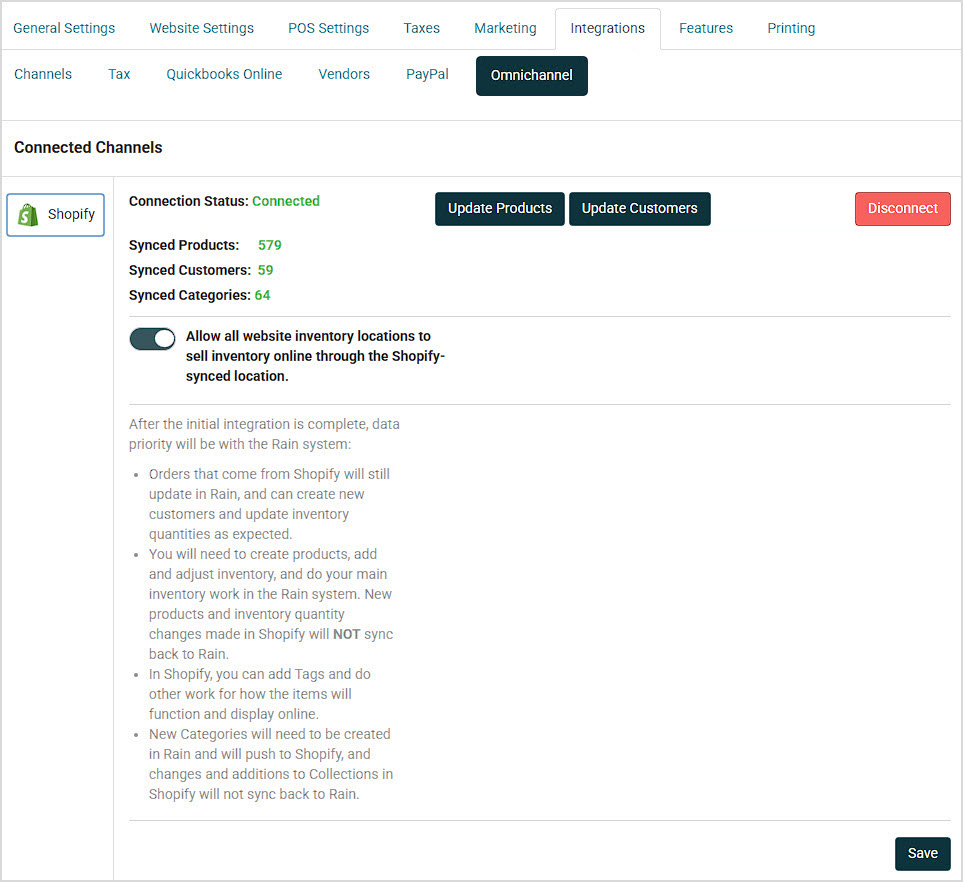
After you are connected, you will see information like what is listed below showing synced data counts and the connection status. If you decide not to use the integration, you can Disconnect but you will need to take care with that option. It is not a temporary function and you will lose your secret key and access token. If you disconnect, you may have to go through the entire integration process again from the start if you decide to use Shopify again.
Your Calendar module will use the same typeface that is your default for your website headings and b
If you have Notions Marketing as one of your product Vendors, you can now add products from their ca
QuickBooks Desktop for Windows is the only supported option right now. We also integrate with Quickb


Is this page helpful?
×Help us improve our articles